
SIGN UP FOR ENERGLYLINK ACCESS
To sign up for Energylink access:
Visit https://app.energylink.com/Public/Signup.aspx
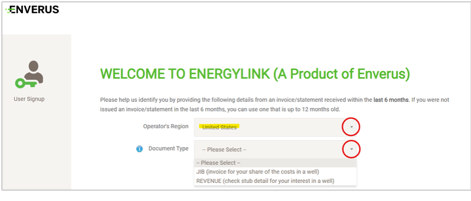
Under Operator’s Region, click dropdown arrow on the right and select “United States”.
Under Document Type, click dropdown arrow on the right and select either JIB (Joint Interest Billing) or Revenue (Revenue check detail).
A JIB (Joint Interest Billing) is an invoice outlining your proportionate share of the costs of developing or operating a well (may not apply).
A revenue statement (aka check stub detail) is the payment detail outlining your proportionate royalty or working interest in a well.
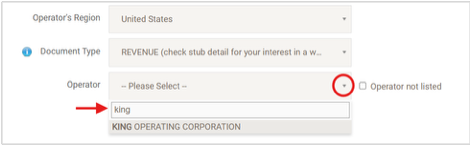
Once JIB or REVENUE option is selected, Operator field will appear. Click dropdown arrow on the right and scroll down to KING OPERATING CORPORATION or start typing “King” in the empty box until KING OPERATING CORPORATION appears. Click on KING OPERATING CORPORATION to select Operator. Additional required information will then appear.
- Owner Number can be found on the check detail of most recent check stub or JIB statement received.
- “Check or Direct Deposit (ACH) Month”: Select the month of the last check or direct deposit payment received by using the dropdown arrow on the right.
- “Check or Direct Deposit (ACH) Amount”: Enter the amount of the last check or direct deposit payment received.
- “Email Address”: Enter the email address you would like to use to access the account and receive notifications for new Revenue check detail or JIB statements.
- “Confirm Email Address”: Re-enter the email address.
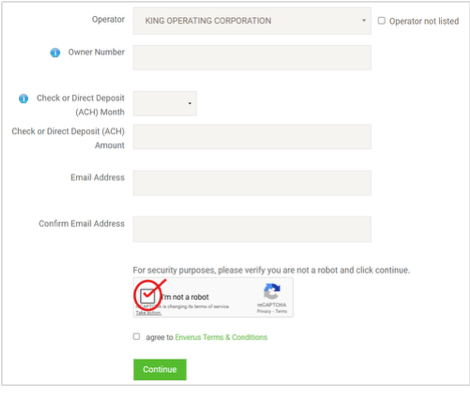
Check the box, “I’m not a robot”
Check the box, “agree to Enverus Terms & Conditions”
Select “Continue”

15301 Dallas Parkway, Suite 900
Addison, TX 75001
(214) 420-3000